Welcome to Feudal ARK Roleplay
A brand new ARK experience, designed by veteran RP architects. In fact, there are so many new things to do that one player could never hope to master them all alone. Players will need to specialize in specific roles and work together to complete their goals. FlightMasters, Breeders, Farmers and Traders can band together to create a new, functioning society.
Please read the lore and rules and create a character that fits in this wonderful world. While we process your application go ahead and check the connect guide below to download and set up the game.


Buy the game on Steam and Epic games
If you already own the game, please skip this step
System requirements:
1. 200 GB free hard drive space
2. 8 GB of RAM(16 GB
Click here to buy from Steam
Click here to buy from
Epic Store
We recommend using Steam

Step 2 - Download the map
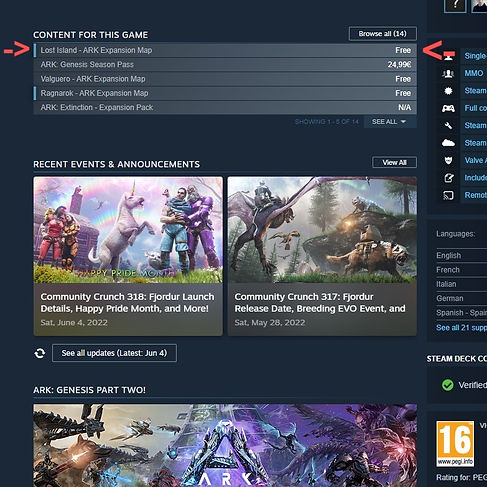
1. Go to Steam Store -> Ark Survival Evolved
2. Scroll down to Content for this Game
3. Select "Lost Island - ARK Expansion Map"
4. Download the map for free.
Step 3 - Subscribe to "Feudal Ark" mod collection
1. You need to have the game + Lost Island map downloaded and ready to play
2. Navigate to your Steam Library and select "Ark: Survival Evolved" from the game list
3. After Ark is selected, press the "Workshop" button.
4. Proceed to click on "Browse" and select "Collections" from the list as shown below
5. Type in the search bar "Feudal Ark" and press enter to search for the collection
6. Click "Feudal Ark - Collection by Dimitry"
7. Once inside the collection, please press the "Subscribe all +" button.
8. Wait for the mods to download.


Step 4 - Add server to favorites on Steam
-
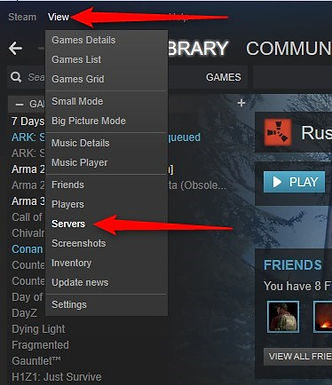
Open Steam.
-
At the top left, click on 'View'.
-
Click on 'Servers' and head over to the 'Favorites' tab.
-
Click 'Add Server to Favorites'.
-
Copy and paste your server's IP and port in the format of IP:PORT.
-
Server IP -- 147.135.253.204:2047

Step 5 - Please start your game and the mods will be automatically installed. -Please do not attempt to join the server until this process is finished!
Step 6 - Click on "Join Ark"
- Click on the box next to "Session Filter" and select "Favorites"
- Click our server, then "Join"
